
ESG AI Leaderboard — Embed quickstart
purposefy.ai/docs/embed-leaderboard-quickstart
Partner quickstart
Embed the ESG AI Leaderboard
Add the Purposefy ESG AI Leaderboard to any page on your site so your readers can explore Fortune-500 ESG rankings without leaving your article. Two lines of HTML, no build step, no cookies.
What this is
The ESG AI Leaderboard ranks the largest public companies by environmental, social, and governance (ESG) performance using a transparent, multi-model methodology. The embed widget lets your readers explore the rankings inline — they can paginate, click a company to see scores, sources, and quarterly trend, and read more about how Purposefy scores companies — all without leaving your page.
The widget is rendered inside a sandboxed iframe served from purposefy.ai, so it's isolated from your site's CSS, JavaScript, and cookies. Your page stays fast, secure, and fully under your control.
Two ways to embed
We give you two snippets — pick whichever fits your CMS. Most partners use the JS loader snippet because it picks up future improvements automatically.
Option A — JS loader snippet (recommended)
Lazy-loads when scrolled into view, auto-resizes the iframe to fit the data, and updates live whenever Purposefy ships an improvement — you don't need to repaste anything.
<script src="https://purposefy.ai/embed-leaderboard.min.js" async></script>
<div data-purposefy-leaderboard="YOUR_SLUG"
     data-theme="light"
     data-layout="table"></div>
Replace YOUR_SLUG with the slug we sent you. Themes: light, dark, auto. Layouts: table (paginated table), top10 (compact card), full (full-width).
Option B — Raw iframe (fallback)
Use this when your CMS strips <script> tags or your security policy doesn't allow third-party JavaScript. No auto-resize — you set a fixed minimum height.
<iframe
  src="https://purposefy.ai/embed/leaderboard/YOUR_SLUG"
  title="Purposefy ESG AI Leaderboard"
  loading="lazy"
  style="width:100%;border:0;min-height:600px"
  referrerpolicy="strict-origin-when-cross-origin"
></iframe>
Add it to your site
Use the area in your CMS that accepts raw HTML, custom code, or embeds. The exact label differs by platform, but the workflow is always the same:
- Open the page where you want the leaderboard to appear.
- Add a Custom HTML, Embed, Code, or Raw HTML block.
- Paste the JS loader snippet (Option A above), save/publish, and open the public page to verify the widget renders.
If your CMS strips the <script> tag after save, use Option B (raw iframe). It does not auto-resize, but it works in stricter editors.
Other CMSes
- Webflow — drag in an Embed element and paste the snippet. Publish.
- Squarespace — add a Code block and paste the snippet. Save.
- Wix — add an HTML iframe element. The Wix sanitizer is stricter; use Option B (raw iframe) for best results.
- Ghost — add an HTML card and paste the snippet.
- Plain HTML / static sites — paste either snippet directly into your HTML where you want the widget to appear.
Customization
Theme, layout, rows-per-page, link strategy, and per-company URL overrides are all configured by Purposefy on our end against your partner record — you don't need to change anything in your snippet.
To request a change (for example, switching from table to top10, changing rows-per-page, or pointing company clicks at a URL pattern on your site), email us at sales@purposefy.ai or visit purposefy.ai/book-demo and we'll roll the change out within 24 hours. Updates propagate live — no resnipping required.
What your readers will see
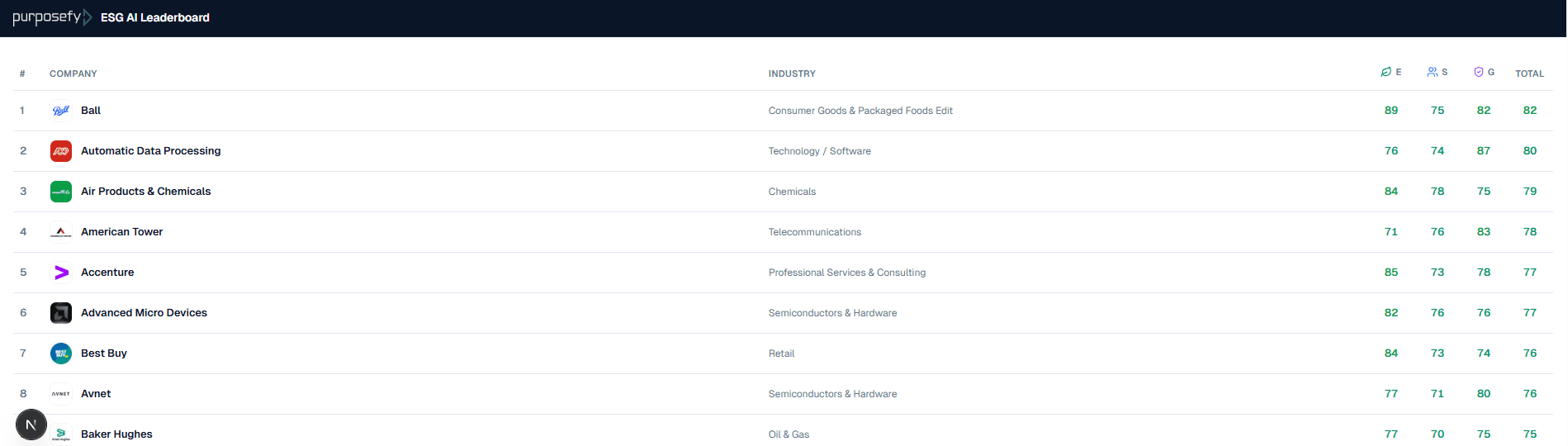
A small branding strip at the top (Purposefy logo + title — defaults to Purposefy ESG AI Leaderboard, customizable by Purposefy on your behalf), followed by a clean, paginated table of the top ESG-rated public companies (Fortune-500 by default; configurable). Each row shows company logo, name, industry, environmental / social / governance scores, and total. Clicking a row opens an in-widget detail panel with source breakdown, quarterly trend, and methodology summary.
Optional co-branding: send Purposefy a transparent PNG of your logo (1× and 2× recommended) and we can render an in partnership with [your logo] group on the right side of the brand strip. Off by default; we turn it on per partner during onboarding.
The footer carries a small Powered by Purposefy wordmark and a Methodology link — both required as part of our partnership terms. Clicking either takes the reader to purposefy.ai in a new tab; they remain on your page.
What we measure (and what we don't)
- Anonymous impression events when the widget renders.
- Anonymous click events (which company was clicked, did the reader follow the brand or methodology link).
- The referring host (so we can verify the snippet is on your allowed domains).
We do not set reader cookies, fingerprint, drop tracking pixels, or pass any reader data to third parties. The widget is GDPR-friendly out of the box; you do not need to add it to your cookie consent banner. Your readers' IP addresses are hashed for rate limiting only and discarded after 24 hours.
You can see the full event stream — top companies clicked, daily impression / click trends, top referrer hosts — in your Purposefy partner analytics dashboard. Email sales@purposefy.ai for access if you don't have it yet.
Troubleshooting
- Widget shows blank / nothing renders
- Check the browser console for
frame-ancestorserrors. Email us the error message — usually means we need to add your domain to the allow-list (one-minute fix on our end). - Widget loads but is fixed at 600 px
- You're using Option B (raw iframe). Switch to Option A (JS loader) for auto-resize. If you can't use JS, increase the
min-heightin the iframe style attribute. - My CMS strips my snippet on save
- Use the CMS's Custom HTML, Embed, Code, or Raw HTML block. If it still strips scripts, fall back to Option B.
- Footer links don't navigate
- If you're using a custom
<iframe sandbox>attribute, addallow-top-navigation-by-user-activationto it, or switch to Option A (the loader sets the right flags automatically). - I want to change the layout / theme / pagination
- Email us; it's a one-minute config change on our end.
Anything else? Email sales@purposefy.ai with a link to the page where the widget is embedded and a screenshot of any console errors. We'll respond within one business day.
Branding requirements
The Powered by Purposefy footer and the Methodology link are part of every embed and cannot be removed. This is the consideration that lets us offer the widget at no cost.
The top branding strip (Purposefy logo + Purposefy ESG AI Leaderboard title on a brand-navy background by default) is configurable. Email sales@purposefy.ai if you'd like a custom header title (e.g. “ESG AI Leaderboard” only), a custom header background colour (any hex value — text and logo colours flip automatically for contrast), or want to enable co-branding with your logo. We'll roll changes out within 24 hours and you don't need to repaste the snippet.
Need help or want to make a change?
Email sales@purposefy.ai or use purposefy.ai/book-demo. For urgent issues (live widget broken on a high-traffic page), reply to the partnership thread you have with your Purposefy contact.